Statement: The specific content of this post was summarized and generated by AI, but the actual setup was completed through testing on my own account. Suggestions and discussion are welcome.
Only methods and principles are discussed; no real domain names, IPs, or keys are included.
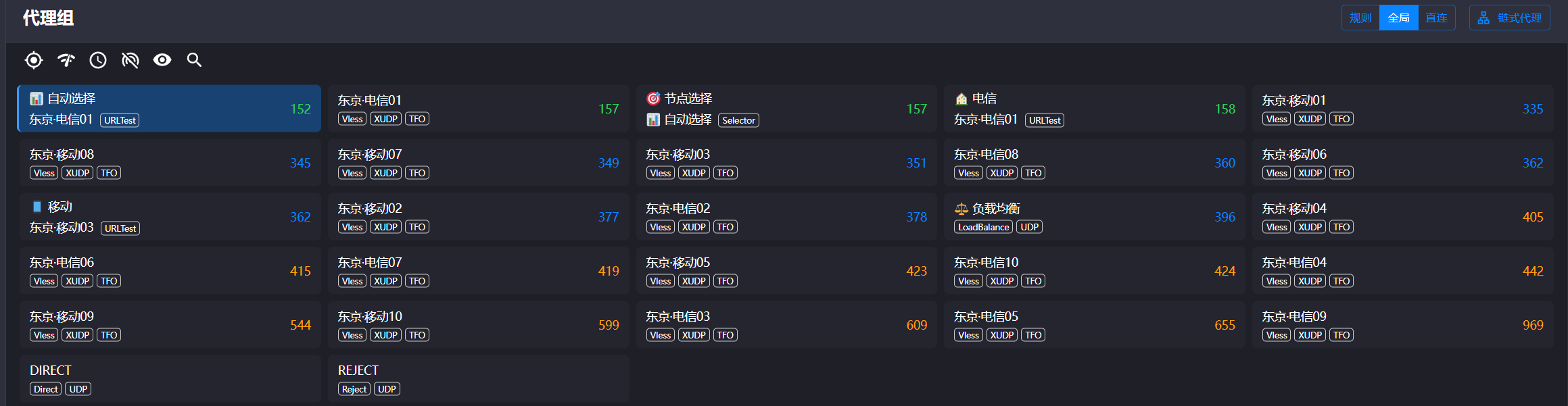
First, let’s look at the results:
I. Speed tests on the server are meaningless
The server measured 200 Mbps, but importing it into Clash yielded only 52 Mbps, with 388 ms latency.
Phone → ISP → international gateway → CF edge → your server → destination
(you can’t measure this part) (this is the part you keep measuring)
The first half determines the user experience, but it can never be measured on the server. At one point, I thought I had optimized everything well (474 Mbps on the server side), yet there was no improvement for users.
Server-side figures are only useful for determining whether the server is the bottleneck. The actual experience must be tested on your own network.
II. Selecting the best IP: usable, but with a fatal misconception
Cloudflare uses anycast, and the tunnel domain responds correctly on any edge IP:
curl --connect-to “tunnel.example.com:443:104.16.x.x:443” https://tunnel.example.com/
A 404 response means the tunnel is reachable (the root path has no handler, which is normal).
Therefore, fill the server field with the fastest edge IP measured in testing, while servername and Host should still contain the tunnel domain.
My mistake: I ran dig for the domain on the server and hard-coded the result. Latency deteriorated from 170 ms to 387 ms. With anycast, the same IP reached from Tokyo and from China Mobile may be routed to completely different PoPs.
You can only use an IP measured through your own ISP. Data from the three major networks illustrates this clearly:
China Unicom 67 ms 50.48 MB/s
China Telecom 51 ms 61.08 MB/s
China Mobile 98 ms 7.12 MB/s (this was the best result Mobile could get)
Even using Cloudflare, China Mobile’s best speed was only 7 MB/s. This is a difference in the network path, not a configuration problem.
III. Latency is a physical problem
Client to Hong Kong edge 62 ms (self-tested)
Hong Kong edge to Tokyo server 26 ms (server-tested)
Tokyo server to destination 26 ms (server-tested)
Total round trip: approximately 114 ms
Clash showed 170 ms, roughly 114 ms plus handshake overhead (about 2 RTTs). 114 ms is the physical lower limit for this architecture; changing the IP or tweaking parameters cannot alter it.
Connection multiplexing (smux / mux) was completely ineffective in testing: 82, 56, 56, 55, 56 ms when enabled, versus 82, 56, 56, 56, 54 ms when disabled. The tunnel’s persistent connection is already active, so handshakes cannot be avoided. Don’t waste time tweaking parameters.
IV. The chain reaction caused by blocked UDP
UDP/53 was available, while UDP/443 and UDP/7844 both returned No route to host.
First, cloudflared must be forced to use HTTP/2; otherwise it will endlessly retry QUIC and fail:
export TUNNEL_TRANSPORT_PROTOCOL=http2
cloudflared tunnel run
Second, QUIC-based protocols such as Hysteria2 and TUIC are completely unavailable.
V. Multi-tunnel aggregation only helps with multiple threads
A single tunnel tops out at 76–110 Mbps, while multiple tunnels can be combined (four tunnels, each with two concurrent streams, reached approximately 474 Mbps). However, Clash’s load-balance distributes connections in rotation, so a single thread can use only one tunnel. Don’t expect multiple tunnels to make a single thread faster.
VI. Keepalive: check whether it works, not whether the process exists
This was the most painful—and most valuable—lesson.
(Incident) Silent outage for 10 hours
The service was down for 10 hours, and the subscription returned 530 with no alerts throughout. The cause was starting a long-running process as a “background task”; the system reaped it when the session ended.
(Must detach from the session)
nohup python3 guardian.py &
The command above will still be reaped along with the session. The correct command is:
setsid --fork python3 guardian.py >> log 2>&1 < /dev/null
Verification: ps -eo pid,ppid,sid,args | grep guardian. PPID must be 1.
(flock is inherited by child processes)
I originally used flock -n to prevent duplicate launches. After the process was killed, a child process it had started (such as sleep) inherited the file lock. The new instance could never acquire the lock, exited immediately, and reported no error. The logs showed started, but the process simply disappeared. I switched to a pidfile.
(Health checks must perform actual probes)
It is not enough to check whether the process is alive. If the process is running but the tunnel is disconnected, it will still report itself as healthy.
A sufficient approach is to perform two actual probes: subscription reachability (only a 200 response counts as working), and a sample test of the entry points (test six entry points through the tunnel handshake; an availability rate below 60% counts as abnormal). If either check fails, rebuild the entry points and restart the service.
(Mutual protection between two processes)
A startup hook launches boot.sh (idempotent). boot.sh launches watchdog.sh (checks every 30 seconds) and guardian.py (inspects every 45 seconds). They watch each other: if guardian stops, watchdog starts it; if watchdog stops, guardian starts it.
(Fault drills are essential)
Kill both the guardian process and the tunnel at the same time and observe the recovery. In testing, both were gone after 3 seconds, everything recovered after 80 seconds, and the subscription returned 200. I also tested the scenario in which all entry points were down by replacing them with unreachable IPs; within one inspection cycle, the system detected an availability rate of 0% and rebuilt them automatically.
VII. Several small pitfalls you are bound to encounter
- IPv6 addresses cannot be enclosed in brackets in YAML.
Writing server: [2606:4700::1] makes YAML interpret it as an array, resulting in a subscription with zero nodes.
The correct syntax is server: 2606:4700::1 - fake-ip mode must be configured with proxy-server-nameserver. Otherwise, the proxy server’s domain may be hijacked and resolved to a fake 198.18.x.x address, causing the connection to fail immediately.
- Write the IP directly into the configuration to bypass client-side DNS. I previously used domain names for the nodes, which caused all user-side connections to time out.
- Don’t rebuild quick tunnels too frequently. Cloudflare will rate-limit you, making all new tunnels inaccessible until service is restored much later.
- If you have a domain, always use a named tunnel. A quick tunnel gets a new domain every time it restarts; a named tunnel never changes.
- Don’t use pkill -f with a keyword to kill processes. If the command line itself contains that string, it will kill itself too. I suffered three consecutive outages because of this. The safe method is to match the executable name exactly:
for p in $(ps -eo pid,comm --no-headers | awk ‘$2==“usque”{print $1}’); do kill $p; done - Port 8443 may be disrupted on some domestic networks. Prefer 443, 2096, 2087, or 2083.
VIII. WARP as a second egress (optional)
Some traffic may be blocked because it is identified as coming from a “datacenter IP.” You can use WARP to add a second egress. Choose usque (the MASQUE protocol, supporting HTTP/2 over TCP and usable even when UDP is blocked):
./usque register --accept-tos
./usque socks -c config.json -p 12345 -b 127.0.0.1 --http2
Then add a socks outbound in Xray and route traffic by inbound as needed.
Measured speeds: direct connection (VPS IP) 35 MB/s; WARP (Cloudflare IP) 7 MB/s.
It is five times slower, but the egress IP belongs to a Cloudflare range, greatly reducing the likelihood of being blocked by risk controls. Its purpose is to provide a backup IP, not to serve as the primary route.
One related conclusion: changing WARP endpoints will not give you an egress in another country. I tried three different endpoints, and all of them ended up in Japan because anycast always uses the nearest route. The egress country is determined by the machine’s location and cannot be changed through configuration.
The five most valuable lessons
I. Server-side speed tests are meaningless; you must test on your own network.
II. The best IP must come from your own ISP. Results obtained with dig on the server are completely unusable.
III. Latency is a physical problem. Calculate the RTT budget and stop tweaking parameters.
IV. Long-running processes must use setsid --fork to detach from the session; otherwise they disappear when the session ends.
V. Keepalive must check whether the service works, not whether the process exists. Use mutual protection between two processes and actually perform a kill drill.
This article contains no usable addresses or keys and is intended solely as a sharing of technical experience.
Passing cats, please give this a like 
I saw that everyone was saying there wasn’t much substance here. Well, they’re right—I didn’t think it through  . I originally intended this as a record of the pitfalls I encountered. So, I’ll share a one-click script for everyone’s reference. My skills are limited, so guidance from all the experts is welcome; I’ll learn with an open mind. Script download link: https://lunch-templates-barely-worthy.trycloudflare.com/dl/cfnode-release.tar.gz