IPQuality
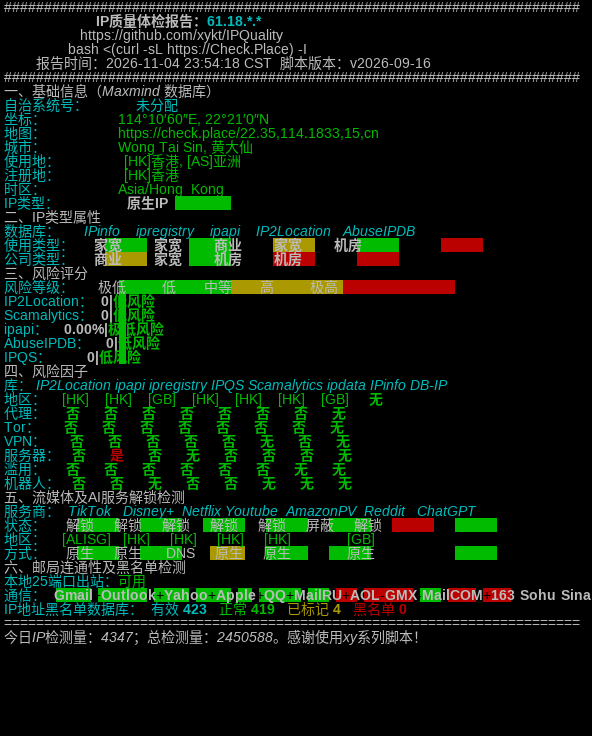
Had AI run a full evaluation (I’m a newbie and don’t really understand this stuff haha)
Evaluation time: 2026-11-05 Machine source: Senior student’s kind sponsorship (free hand-me-down)
One-sentence summary
A top-tier, clean residential IP for “unlocking enthusiasts,” paired with a route back to mainland China for “archaeologists.”
10G within Hong Kong, 1G internationally, zero risk across all four IP databases, and native access to Disney+/YouTube/TikTok/ChatGPT—but if your users are in mainland China, the 334 ms RTT and US-routed paths will teach you a harsh lesson.
1. Basic configuration
| Item | Specification |
|---|---|
| CPU | 4 vCPUs of AMD EPYC 7763 (Milan, 2021 architecture) |
| Memory | 966 MB (no swap) |
| Disk | 8 GB (ext4, /dev/sda) |
| Virtualization | KVM (dedicated kernel, not LXC/OVZ) |
| System | Debian 13 (trixie), kernel 6.12.74 (2026-03, very recent) |
| Network | IPv4 only, no IPv6; TCP congestion control: CUBIC (BBR not enabled) |
| Provider | Hong Kong Cable Television i-Cable (residential ASN), located in Wong Tai Sin by MaxMind and Tsuen Wan by ip-api |
Comments:
- KVM + dedicated kernel + very recent Debian 13: a solid foundation, with plenty of room to experiment with Docker, BBR, and custom tweaks.
- 1 GB of memory is the clear weak point: even Geekbench 6 won’t run (it requires 1 GB+), and running two containers with Docker requires careful resource management.
- The 8 GB disk is tiny, so forget about hosting PT or storing data.
- Although the EPYC 7763 uses an “ancient” architecture, the four cores are genuinely available, as shown below.
2. CPU: A veteran with no signs of overselling
Geekbench 6 was abandoned due to insufficient memory (I’ll test again if the senior student provides swap). OpenSSL quick stress testing was used instead:
text
AES-256-CBC(4线程):≈ 2.9 GB/s(单核 ≈ 720 MB/s)
SHA256(4线程): ≈ 4.1 GB/s(SHA-NI 硬件加速生效)
Single-core AES reached ~720 MB/s, which is normal for Milan. No frequency limiting or CPU deductions caused by overselling were found. Both AES-NI and SHA-NI hardware acceleration are active, so proxy encryption and HTTPS are no problem.
3. Disk: 4K performance is disappointing
fio mixed read/write (50/50):
| Block size | Read | Write | IOPS |
|---|---|---|---|
| 4K | 2.07 MB/s | 2.09 MB/s | ~505 |
| 64K | 33 MB/s | 34 MB/s | ~505 |
| 512K | 128 MB/s | 135 MB/s | ~250 |
| 1M | 127 MB/s | 135 MB/s | ~125 |
Sequential read/write at 260 MB/s is mediocre, but 4K performance is only 505 IOPS, most likely due to network storage or a low-speed shared disk. Databases and applications with many small files will suffer noticeably; as a download relay or static site, it’s fine.
4. Network: Half seawater, half flames
4.1 Hong Kong & international: surprisingly powerful
Ookla’s official CLI against a local Hong Kong node (GSL Networks):
text
下行 11,301 Mbps | 上行 22,944 Mbps | 延迟 0.41ms | 丢包 0%
结果链接: https://www.speedtest.net/result/c/c7faef07-e57e-484f-a2da-85c0db75ba2d
This is a 10G-class connection. Latency to Cloudflare edge nodes is only 0.6 ms, while iperf achieved 1.06/1.31 Gbps to Amsterdam (175 ms); London is weaker (141 Mbps @202 ms). For a residential machine, this kind of bandwidth within Hong Kong is seriously impressive.
4.2 Mainland China: routed through the US across the board
Actual MTR return-path results (15 packets per line):
| Direction | Path | Final latency | Packet loss en route |
|---|---|---|---|
| → China Unicom Beijing | i-Cable → Cogent (AS174) → Los Angeles → San Jose → China Unicom 4837 | 231 ms | 33~40% |
| → China Telecom Shanghai | i-Cable → Cogent → Los Angeles → San Jose → 202.97 backbone | 297 ms | 33~93% |
| → China Mobile Beijing | i-Cable → RETN (AS9002) → third-party relay → CMI | 170 ms | 13~33% |
The three major carriers have no direct or optimized routes whatsoever. All traffic is routed through overseas third-party relays, and the China Telecom route even makes a round trip through Los Angeles. Ping matrix: China Unicom 226–263 ms, China Telecom 299–347 ms, China Mobile 170–222 ms.
Actual download tests toward mainland China (files retrieved from mainland mirrors, reflecting two-way mainland–Hong Kong quality):
text
华为云(大陆):56 MB/s ≈ 59 Mbps
腾讯云(大陆):40 MB/s ≈ 42 Mbps
Actual ping from a mainland residential connection (China Mobile): 334 ms, 10% packet loss.
Conclusion: this machine is unsuitable for any low-latency mainland-China scenario—forget about mainland-facing websites, mainland users, or game acceleration. This is the classic trait of an i-Cable residential connection: the IP is genuinely excellent, while the routing is genuinely awful.
5. Streaming & AI access: the machine’s biggest selling point
Cross-verified with the RegionRestrictionCheck and xykt scripts:
| Service | Status | Method |
|---|---|---|
| Disney+ |  Native access |
HK region |
| YouTube Premium | Native access |
HK region |
| Netflix | Unblocked |
DNS unlocking (HK region, not native) |
| TikTok | Native access |
ALISG |
| ChatGPT | Native access |
Service available |
| Amazon Prime Video | Unblocked (playback verified with xykt) |
HK |
| Local Hong Kong | MyTVSuper Native / Viu Native / ViuTV |
— |
 Conflicting script results (RRC says accessible, xykt says blocked) |
Trust your own test | |
| Spotify registration / Google Gemini / Bilibili HK/Macau/Taiwan |  |
— |
Steam currency is HKD and Bing identifies it as HK—this is a “real Hong Kong region identity.”
6. IP quality: zero points across all four risk databases
This is the most impressive part of the article. xykt IP quality report (SVG report link):
text
IP2Location: 0|低风险
Scamalytics: 0|低风险
ipapi: 0.00%|极低风险
AbuseIPDB: 0|低风险
代理/Tor/VPN: 全部未标记(仅 ipapi 标了"服务器"一项)
黑名单: 423 库中 420 正常、3 已标记、0 黑名单
IP 类型: IPinfo / ipregistry / IP2Location 三库均判"家宽"
原生 IP: ✅
One more excellent discovery: outbound port 25 is available locally. Communication with major mail providers such as Gmail, Outlook, Apple, 163, and Sohu is basically unrestricted. That means it can serve not only as a proxy exit but also as a legitimate mail-sending host—something almost unheard of among commonplace datacenter IPs.
7. Pros and cons
Pros
- Top-tier IP cleanliness: zero scores in all four major risk databases, residential classification, and no proxy/VPN markings
- Full Hong Kong/international access package: Disney+/YT/TikTok/ChatGPT/Steam all green
- 10G within Hong Kong plus 1G+ toward Europe; bandwidth worthy of the word “luxurious”
- KVM + new kernel + four non-oversold cores, with plenty of room to experiment
- Outbound port 25 available, so it can send email
Cons
- All mainland routes go through the US: 170–350 ms + double-digit packet loss, with only 40–60 Mbps toward mainland China
- 1 GB memory with no swap; even GB6 cannot run
- Tiny 8 GB disk + 505 4K IOPS; storage and random I/O are both weak
- No IPv6
- CUBIC by default; BBR must be enabled manually
- Residential characteristics: the IP may change after the broadband connection reconnects, and stability depends on the senior student’s home router
8. Who should use it / How to get the most out of it
| Use case | Suitability |
|---|---|
| Hong Kong streaming access / family media sharing | ★★★★★ |
| ChatGPT / overseas AI services and risk-control avoidance | ★★★★★ |
| Clean exit IP for overseas business (email, registration, trusted IP for risk control) | ★★★★☆ |
| Personal proxy for Telegram / overseas services | ★★★★☆ |
| Low-latency access to mainland China / CN-optimized routes | ★☆☆☆☆ |
| Databases / PT / large-scale storage | ★☆☆☆☆ |
Three things to do after taking over:
bash
# 1. Enable BBR (bare CUBIC is a huge disadvantage)
echo -e "net.core.default_qdisc=fq\nnet.ipv4.tcp_congestion_control=bbr" >> /etc/sysctl.conf && sysctl -p
# 2. Add 1G of swap to help the 1G of memory
fallocate -l 1G /swapfile && chmod 600 /swapfile && mkswap /swapfile && swapon /swapfile
echo "/swapfile none swap sw 0 0" >> /etc/fstab
# 3. Treat the 8G disk carefully: configure log limits and Docker cleanup policies in advance
9. Overall rating
| Category | Score | Brief comment |
|---|---|---|
| IP quality | 9.5 / 10 | Zero across all four databases; native residential IP; 0.5 deducted for the three flagged databases |
| Streaming/AI access | 9 / 10 | All green; Netflix is not natively unlocked and Reddit is uncertain |
| Hong Kong/international bandwidth | 8.5 / 10 | Flawless 10G connection within Hong Kong; London direction is poor |
| Mainland-China routing | 2 / 10 | US detours + packet loss; nothing to defend |
| Hardware configuration | 6 / 10 | CPU genuinely delivers; memory and disk are both weak points |
| Tinkerability | 8 / 10 | KVM + new system + root; use it however you like |
| Overall | 7 / 10 | Depends on the use case: a superb unlocking toy, but scrap metal for mainland routing |
Getting this configuration on a free machine—credit where it’s due, the senior student really delivered. Use it as a Hong Kong-region unlocking and AI-service exit, and you’ve hit the jackpot; use it to host a site for mainland users, and is that the senior student’s fault? No, it’s yours—you didn’t even finish reading this article.

