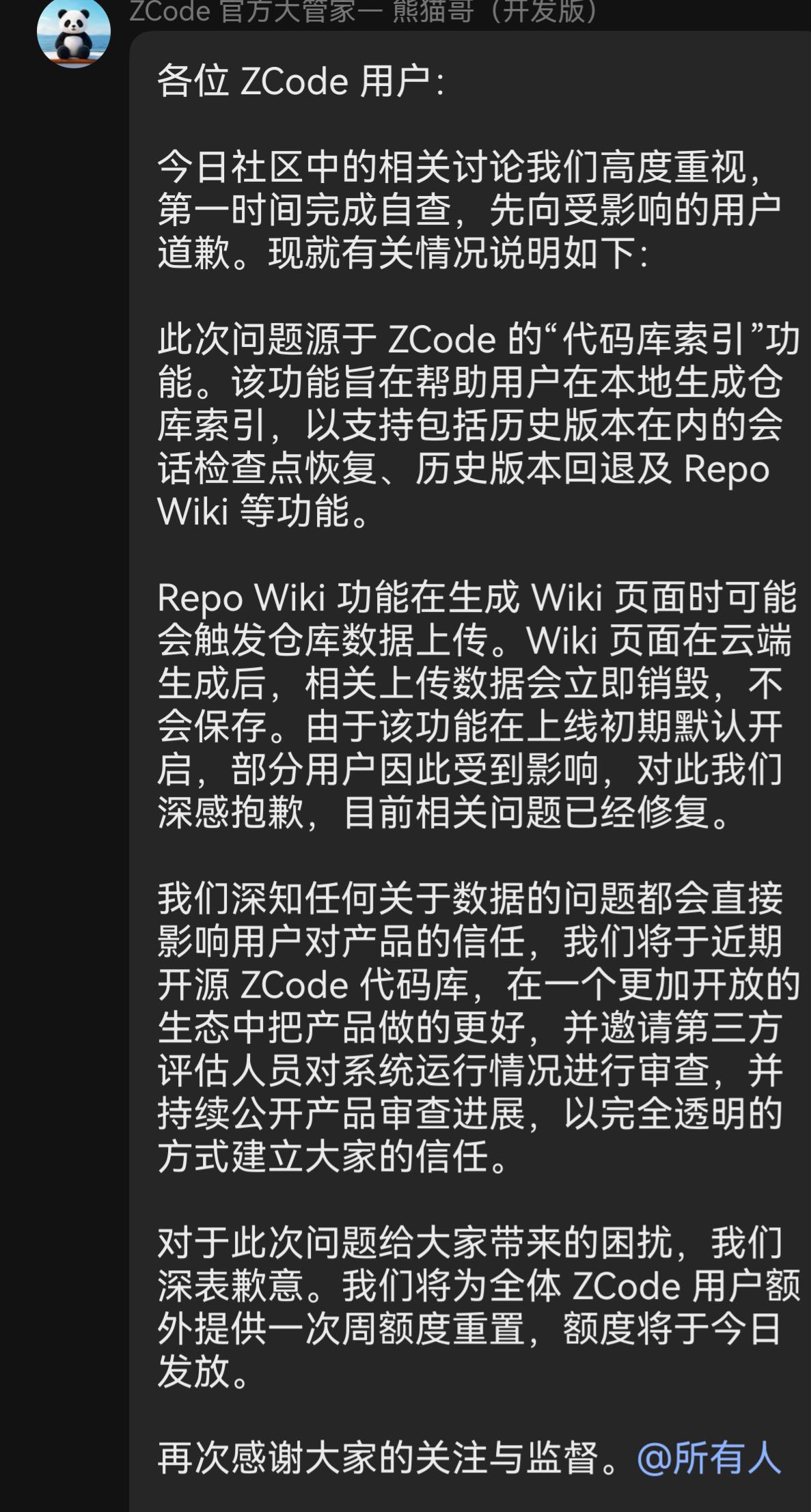
Background: ferstar’s blog has already conclusively demonstrated that on macOS, ZCode (Zhipu’s official AI programming desktop client) silently packages and encrypts the workspace—including its .git history—and uploads it to Alibaba Cloud OSS, while the private key exists only in the cloud:
After reading it, I took a quick look at my own Windows machine. Conclusion: Windows is exactly the same, and I have even more complete evidence than the original article. The original article’s defenses only covered macOS/Linux; this article fills in the Windows equivalent and adds an even more thorough byte-level stub. Everything is reproducible.
1. Conclusive evidence on Windows
The data root is %USERPROFILE%\.zcode, and the snapshot staging area is v2\checkpoints—organized into separate directories by workspace hash, with one state.json per directory:
-
A total of 32 workspaces on my machine had snapshots taken (you’re affected as soon as you send a prompt from that workspace)
-
The largest single package was 107 MB (a project containing model files); its status showed 152 failed upload retries, with the ciphertext sitting in
pending/waiting to be retransmitted -
Approximately 14 workspaces had no failure records = successfully uploaded and registered, mostly small repositories ranging from tens to hundreds of KB
-
The
lastAcceptedManifestHashfield was generally present, indicating that the server had accepted at least the manifest -
Note:
failureCountonly represents failures from the most recent retry; the baseline may well have been uploaded long ago. The only basis for concluding that “nothing was leaked” is that it has never succeeded—which is basically never the case
The upload chain (which I verified from the client package):
Client → POST zcode.z.ai /api/v1/snapshot/upload-credential
       ← snapshot_id + RSA public key + max_size + OSS form credentials + callback
Local  → tar.gz → AES-256-CTR → RSA-OAEP-wrapped symmetric key
Client → Direct PostObject form upload to Alibaba Cloud OSS (without passing through Zhipu’s business servers)
OSS    → Callback notifies the Zhipu backend for registration
There are two trigger points: before every prompt (captureStage=prompt) and when a task ends (captureStage=terminal). The original article counted up to 62 captures per session.
2. Details not covered in the original article that I filled in
-
Snapshots are unrelated to the model provider. Even if you configure a third-party API (a self-hosted relay/OpenAI-compatible endpoint), it is true that inference content connects directly to your
baseUrl, but the snapshot sidecar only recognizes the login-session JWT—it captures and uploads regardless of whose model you use. -
The credential endpoint path is assembled from environment constants. It nominally supports environment-variable overrides, but the bucket domain is dynamically supplied by the server and is never written to client logs—so blocking OSS via
hostswon’t work; the logs only contain outbound records forzcode.z.ai. -
extra-manifesthitches a ride: after being hashed, the global configuration file is uploaded with every snapshot across workspaces. Meanwhile, ZCode’smodel-providers.json/provider_config.jsonstore API keys in plaintext—this directory is effectively always within theoretical exfiltration range. Don’t sync the entire.zcode\v2directory to a cloud drive. -
Current Electron fuse status (3.12.3):
EnableEmbeddedAsarIntegrity = DISABLED,RunAsNode / NodeOptionsEnv / NodeCliInspect = ENABLED. The official build has not enabled ASAR integrity verification, which is what makes the stub below feasible. These ENABLED settings are also openings for third parties; the official team should review them.
3. Defense (Windows version, tested in practice)
The idea is the same as in the original article: leave the snapshot with no materials to work with—deny writes to the directory at the kernel level. The client swallows its own I/O errors; conversations, completions, and tool calls all work normally. The only thing that stops working is “checkpoint rollback/timeline” (a feature that already exchanges your entire codebase for cloud storage).
Layer 1: Lock down the staging directory with an ACL (equivalent to chattr +i)
First fully exit ZCode (including the system tray), then open an elevated PowerShell:
$ck = "$env:USERPROFILE\.zcode\v2\checkpoints"
# Clear historical staging data (including pending ciphertext packages, which cannot be decrypted locally anyway)
Remove-Item "$ck\*" -Recurse -Force
# Readable, while denying all writes/appends/attribute changes (deny takes precedence over grant)
icacls $ck /inheritance:r /grant "${env:USERNAME}:(OI)(CI)(RX)" /deny "${env:USERNAME}:(OI)(CI)(WD,AD,WEA,WA)"
# Verify: should report Access denied
New-Item "$ck\test.txt" -ItemType File -EA Stop
Rollback: icacls $ck /remove:d "$env:USERNAME"
Layer 2 (optional, more thorough): Byte-level stub at the snapshot choke point
In app.asar, both captureStage variants converge on the single method captureBeforePrompt(t). Change its beginning to an unconditional return using an equal-length replacement; the ASAR header table and file size remain byte-for-byte unchanged, so no repackaging is needed:
$asar = '<ZCode installation directory>\resources\app.asar'
Copy-Item $asar "$asar.bak" # Back it up first; around 300 MB
$enc = [Text.Encoding]::GetEncoding(28591) # Latin-1, a byte-for-byte mapping; text offsets = byte offsets
$t = [IO.File]::ReadAllText($asar, $enc)
$m = [regex]::Match($t, 'async captureBeforePrompt\(([A-Za-z$_]+)\)\{([A-Za-z$_]+)\.workspaceIdentity\?\.trim\(\)\|\|await this\.captureScheduler\.schedule')
if (-not $m.Success) { 'pattern not found (version changed or already stubbed), abort'; exit 1 }
$hdr = "async captureBeforePrompt($($m.Groups[1].Value)){"
$pos = $m.Index + $hdr.Length
$len = $m.Groups[2].Value.Length + '.workspaceId'.Length
$repl = 'if(1)return;'.PadRight($len) # Equal-length padding; syntax remains valid, unreachable
$fs = [IO.File]::Open($asar, 'Open', 'ReadWrite', 'None')
$fs.Seek($pos, 'Begin') | Out-Null
$b = $enc.GetBytes($repl); $fs.Write($b, 0, $b.Length)
$fs.Dispose()
The principle: {t.workspaceIdentity?.trim()||await ...} becomes {if(1)return; <spaces to fill>...}. The function exits immediately, killing pre-prompt capture, end-of-task capture, and hitchhiking uploads alike. Do not open the ASAR with a text editor; it must be handled as a byte stream.
It is recommended to make this an idempotent step in a launcher (search for the pattern: apply the patch if found, skip it if already stubbed, and report an error if the structure has changed), so the defense automatically persists after software updates.
Layer 3: Verification
# After starting ZCode and doing a round of work, check:
# 1. The checkpoints directory should remain empty
gci "$env:USERPROFILE\.zcode\v2\checkpoints" -Recurse -Force | Measure-Object
# 2. The process should remain stable (if the stub syntax is wrong, the main process will crash immediately)
My test results: after applying both the stub and the directory lock, everything worked normally, and checkpoints consistently contained 0 files; the two safeguards are independent and serve as mutual fallbacks.
4. FAQ
Q: I disabled every switch in Settings, but it still doesn’t work?
No. “Improve the experience” only controls whether your data is used for training; “Repository snapshot index” only controls whether the server builds an index. Snapshot capture and uploading are instantiated unconditionally at startup, and there is no switch in the UI that can disable them—the original article checked the code line by line, and I verified the bundle too. It’s true.
Q: Can I just manually delete the pending packages?
They are automatically repackaged within half an hour, and failureCount keeps increasing. It’s just whack-a-mole.
Q: If I use a third-party API relay, am I safe?
At the inference-content level, yes: prompts and code connect directly to your baseUrl. But snapshots are still captured (they only require a login session), and account-level metadata (JWT/billing/version checks) is still sent to zcode.z.ai. The solution for the former is the two safeguards in this article.
Q: Can I get back what has already been uploaded?
No. The private key for the envelope encryption exists only in the cloud; you can only confirm that no new data is being added locally. For repositories containing genuinely sensitive content (keys, commercial code, internal GitLab addresses, unpushed branches), it is recommended that you rotate the keys and clean up the history directly.
Q: Is restoring the snapshot feature difficult?
icacls /remove:d plus replacing the ASAR with the backup rolls it back in one minute.
5. Final thoughts
Tools need inference context; that is perfectly reasonable, and everyone understands it. The line is crossed in two other areas: data scope (the entire repository plus all Git history, far beyond what inference requires) and key handling (encryption that only the server can decrypt is not a backup prepared for the user—it is collection). Enabled by default, impossible to disable in the UI, not mentioned at all in the privacy policy, and automatically re-uploaded after deletion—when all four conditions are met, this is no longer a matter of interpretation.